CUSTOM BUSINESS SOFTWARE / DESIGNED FOR YOUR DAILY WORK

Your workflow.
Your software.
Your computer.

When quotations, stock, jobs and payments keep moving between files, build a workspace that connects them.

Custom offline Windows software for interior studios, furniture workshops and owner-run businesses. Start with the process that causes the most repeated work.

One-time project quote · No mandatory Arunaksha software subscription · One primary Windows workstation

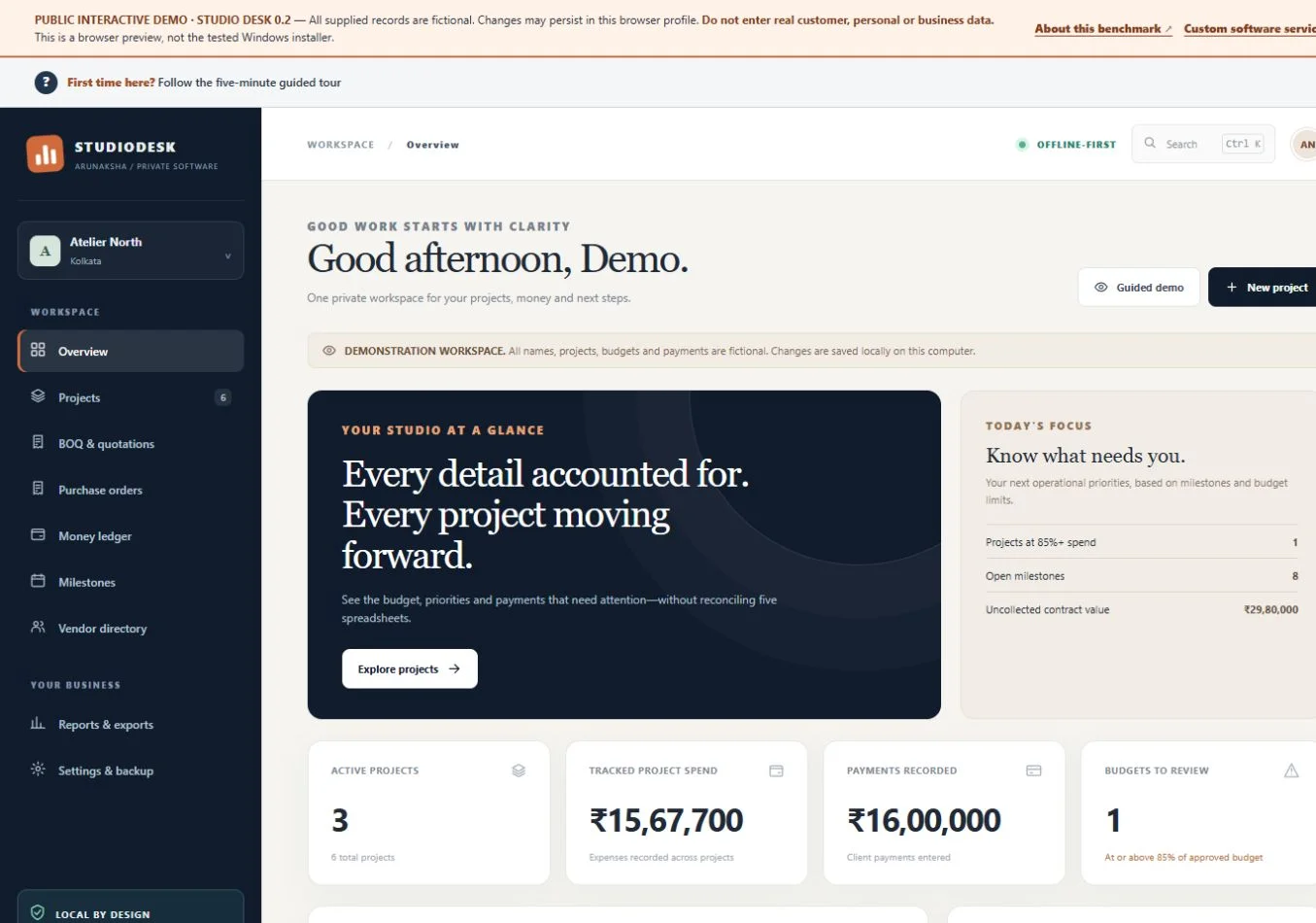
STUDIODESKPROJECTS + MONEY ↗
Actual StudioDesk browser demo with fictional studio projects, budgets and upcoming work
For a studio: preserve the quote. Follow the costs.
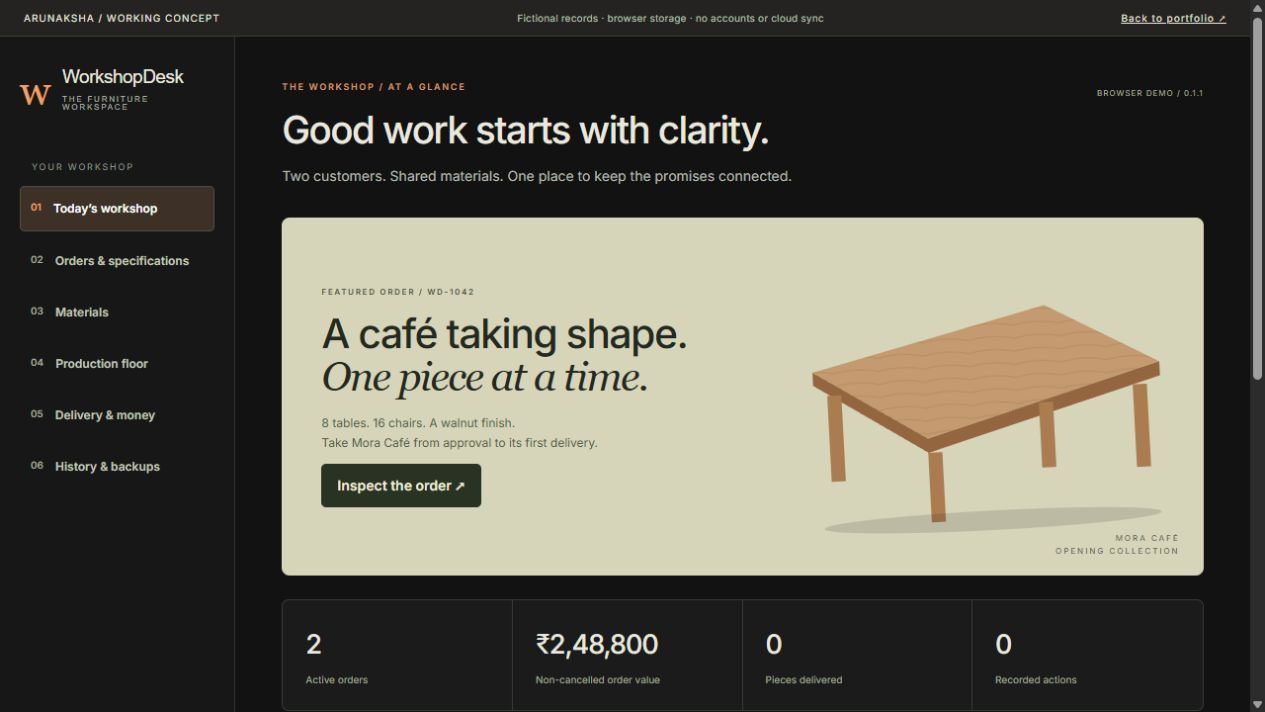
WORKSHOPDESKMATERIALS + PRODUCTION ↗
Actual WorkshopDesk browser demo with a fictional furniture order and order-to-delivery workflow
For a workshop: reserve materials. Deliver in parts.

Actual browser demos with fictional records. Windows installation and device acceptance are separately verified for each commissioned build.

Built around your processCore work stays localPrice agreed before developmentExport, backup and handover defined

RECOGNISE THE WORKAROUND?

The problem is the work
between the files.

A custom application becomes useful when the same handoffs, checks and corrections keep repeating. These are the kinds of problems a defined workflow can address.

01 / THE DAILY QUESTION

Which version did the client approve?

The quotation is in a sheet. The approval is in a message. The latest changes are somewhere else.

WHAT THE SOFTWARE CAN DO

Keep approved versions beside the project, with purchasing and costs connected to the right record.

See the StudioDesk workflow ↗
02 / THE DAILY QUESTION

Can we actually start this order?

Two jobs need the same materials. A stock total alone does not show what is already promised.

WHAT THE SOFTWARE CAN DO

Separate available, reserved and consumed materials before starting a production batch.

See the WorkshopDesk workflow ↗
03 / THE DAILY QUESTION

What is finished, delivered and still due?

A job looks complete, but some items have not left the workshop and a payment is still outstanding.

WHAT THE SOFTWARE CAN DO

Keep production, partial delivery and collections as separate facts you can inspect together.

Try a partial delivery ↗

TWO DIFFERENT WORKFLOWS / TWO WORKING EXAMPLES

Inspect the decisions.
Then try the software.

These are independent demonstrations. You can change sample records and see the consequences. Your commissioned application would follow your own requirements.

01 / INTERIOR STUDIOS

StudioDesk.
Keep the quote connected
to the cost.

A project can look profitable until purchases and expenses start drifting away from what was quoted. StudioDesk puts the agreed revision, supplier commitments and actual spending into connected records.

  • Inspect a project’s budget and recorded expenses.
  • Save a quotation revision without rewriting its history.
  • Follow purchasing and explore the reports.
StudioDesk's actual overview screen, showing fictional project budgets and financial status
Actual interface capture · Fictional studio records
02 / CUSTOM FURNITURE WORKSHOPS

WorkshopDesk.
From an approved order
to the last delivery.

Knowing what is in stock is only the start. WorkshopDesk connects approved specifications, material reservations, production batches and partial dispatches across two sample orders.

  • Approve a specification and reserve shared materials.
  • Resolve a shortage and move a batch through production.
  • Dispatch part of an order; record the payment separately.
WorkshopDesk's actual overview with fictional furniture orders and guided workflow entry points
Actual interface capture · Illustrated furniture · Fictional orders

YOUR PROCESS SETS THE SCOPE

Build the parts
your business needs.

These are possible building blocks, not a bundle automatically included in every quote. We connect the records that need to work together.

Describe your workflow ↗
01

Quotes & approvals

Your line items, document formats and preserved revisions.

02

Projects & job records

Customer requirements, stages, due dates and the next action.

03

Stock & materials

Receipts, reservations and consumption against an order.

04

Production & delivery

Batch progress, finished quantities and partial dispatch.

05

Collections & costs

Payments received, direct costs and outstanding balances.

06

Reports & recovery

Agreed summaries, exports, backups and a tested restore path.

OFFLINE SOFTWARE VS AN ONLINE SUBSCRIPTION

Keep core work on your computer.
Choose what you pay for next.

If one office computer runs the workflow, you may not need a cloud account and a recurring licence just to keep using the agreed application. Local software is strongest when the work, operator and records belong in that one place.

01 / CONTINUITY

Core work without internet.

Prepare the agreed records and reports locally. External services still need a connection.

02 / CONTROL

A defined application to keep using.

No mandatory recurring Arunaksha software licence. New features and support remain your separately scoped choices.

03 / FIT

Your rules, fields and documents.

Commission the workflow you need, including the exceptions a generic template may not handle.

Compare the operating model before commissioning a build
The decisionCustom offline applicationHosted subscription software
How you payAn agreed upfront build fee. Support and future changes are separately scoped.Recurring access fees; setup, extra users and add-ons depend on the provider.
Working without internetAgreed core tasks run locally on the specified Windows computer.Cloud features usually need connectivity; some products offer offline modes.
Where records liveA local data store with an agreed export and backup process.A hosted service, subject to its access, export and retention arrangements.
Fitting your processWe define the fields, documents and business rules around the agreed workflow.You configure the product’s supported features and available extensions.
Working across locationsOne primary workstation in this offer. Shared access needs separate design.Often the stronger fit for remote teams and shared live records.
Offline is a fit decision, not a claim that custom is always cheaper or safer.

Compare the full cost of building, migration, support, backups and upgrades. A suitable existing product may be the better buy. Local data still needs device protection and a separately stored backup. If staff need shared live records across locations, explore a custom web application.

A QUICK STARTING POINT

Is offline software
a sensible fit?

Two questions to choose the next conversation. This is a starting point, not a technical assessment or a price estimate.

No contact details requested. These choices stay on this page.

BEHIND THE DESIGN / WHY THESE TOOLS WORK THIS WAY

The important design happens
before the dashboard.

A useful screen starts with a clear rule: what can change, what must stay fixed, and what should happen when something goes wrong.

01 / PRESERVE THE AGREEMENT

A revision is a record.

StudioDesk preserves quotation versions so a later edit does not silently change what an earlier quote contained.

Your project: define the records that must keep their history.
02 / SEPARATE DIFFERENT FACTS

Ready is not delivered. Delivered is not paid.

WorkshopDesk tracks finished quantities, dispatch and collections separately. A single “complete” status would hide those differences.

Your project: model the decisions the owner actually needs to make.
03 / DESIGN FOR INTERRUPTIONS

Recovery belongs in the workflow.

The demos reject conflicting saves and validate backups. Recovery screens preserve records when an active workspace cannot be opened.

Your project: agree how data is exported, backed up and restored.
Arunaksha Sarkar, independent website and business software developer
ARUNAKSHA SARKAR / KOLKATA

WHY WORK WITH ME

One person connecting
the process, design and build.

You work directly with me to define the workflow, review the interface and agree what counts as finished. My e-commerce operations and website work inform how I approach records, handoffs and day-to-day usability.

Inspect the work before deciding.

Try two different operational demos. Discuss the choices you would change for your own business.

Review the rules as well as the screens.

We define calculations, approvals, exceptions and recovery requirements before treating a dashboard as the answer.

Know what you receive.

Scope, price, handover, source-code rights, third-party licences and support terms belong in writing.

More about my background and approach ↗

FROM YOUR WORKFLOW TO A WORKING APPLICATION

Start small enough to define.
Build it properly.

The first project should solve a complete, important workflow. More modules can follow when the operating need is clear.

  1. 01

    Map one real workflow

    Show what starts the job, which records change, who makes decisions and what comes out at the end.

    A workflow map and a fit recommendation.
  2. 02

    Agree the scope and prototype

    Review the important screens, sample documents, rules and exclusions before the full build.

    A written quote, milestones and acceptance criteria.
  3. 03

    Build around the rules

    Test representative tasks, invalid entries, conflicting changes, exports and recovery against the agreed scope.

    A reviewable application with specific checks to pass.
  4. 04

    Verify on the agreed computer

    For a Windows delivery, installation, offline operation, backup and restore are part of the agreed acceptance process.

    The agreed installer, guidance, rights and support terms.

HOW THE PROJECT IS PRICED

A written scope.
A one-time project quote.

The price follows the connected workflows, business rules, reports, migration and recovery requirements. A small records tool and an order-to-production system are different projects.

No mandatory recurring Arunaksha software licence. Future changes, support and external services are quoted separately.

Your proposal should answer:

  • Which screens, records and documents are included?
  • What works offline, on which Windows computer?
  • Which imports, exports and recovery checks are included?
  • What are the milestones, price and acceptance criteria?
  • What rights, handover and support do you receive?
Request a scope discussion ↗

A clear description is enough to start. No purchase commitment.

BEFORE YOU COMMISSION IT

The practical
buying questions.

Ownership, offline operation and future costs need clear answers.

01Am I buying StudioDesk or WorkshopDesk?

You are enquiring about a custom software project. The two free browser demos show different workflows and design decisions; they are not ready-made Windows packages for sale. Your requirements, deliverables and acceptance checks are agreed separately.

02Will my application work without internet?

The agreed core records, calculations and reports are designed to run on one Windows computer without internet. Email, messaging, payment gateways, online AI and remote access need connectivity and separate scope. The public browser demos do not prove that a Windows installer has been tested.

03Is there a monthly subscription?

There is no mandatory recurring Arunaksha software licence for the delivered application. Development is quoted as a one-time project fee. Support, upgrades, data migration, third-party licences and any external services are specified separately. One-time development does not mean lifetime maintenance is free.

04Will custom software cost less than a subscription?

Not necessarily. A custom build has an upfront cost and future maintenance needs. Compare development, migration, support, backup, upgrades and any external services with the subscription product’s total cost and fit. If existing software already handles the essential workflow, buying it may be the better decision.

05Who controls the data and source code?

Your business controls its local records and receives the agreed export and handover materials. Client-specific source-code rights, reusable components, third-party licences and future developer access are written into the proposal before development.

06Can you bring in our spreadsheets?

Data migration can be included after reviewing a redacted sample, its structure and data quality. The proposal identifies supported imports, cleanup responsibilities and reconciliation checks. Do not send live customer databases or confidential records with the first enquiry.

07What happens if the computer fails?

An offline application needs backups kept separately from the working computer and a tested restore procedure. Backup format, frequency, responsibility and replacement-device recovery are agreed in the project. Local storage alone is not a backup or a security guarantee.

08Can several people use it from different locations?

That usually calls for a shared web application or a separately assessed networked system. The initial desktop offer is for one primary Windows workstation. We should choose the architecture around the users, rather than force remote collaboration into a single-computer tool.

09What does the quote depend on?

The number of connected workflows, business rules, screens, documents, reports, data imports, access requirements and recovery needs. You receive a written scope, project price, milestones, acceptance criteria, ownership terms and support terms before deciding to proceed.

BRING THE BOTTLENECK. WE WILL DEFINE THE SOFTWARE.

What do you keep
checking by hand?

Tell me what you track today, where the process breaks, and who needs to use the records. We can decide whether a focused offline application is worth building.

Describe the workflow only. Please do not send confidential customer data or passwords.